
How Chevy Safety Assist on the 2026 Chevrolet Trax Supports Confident Commuting around Victoria, TX
Ancira Partners Chevrolet – How Chevy Safety Assist on the 2026 Chevrolet Trax Supports Confident Commuting around Victoria, TX
Chevy Safety Assist is standard across the Trax lineup, placing key driver assistance features at your fingertips for rush-hour traffic, neighborhood streets, and late-night highways. The system bundles core functions that work in concert to help you detect hazards earlier and respond more smoothly. With clear alerts and smart braking support, the Trax complements your attention, rather than replacing it, so you stay in command of the drive while the technology works quietly in the background. Combine this foundation with intuitive infotainment—standard wireless Apple CarPlay® and Android Auto™—and the Trax keeps your focus forward while still giving you the tools to navigate and communicate hands-free.
In real-world terms, these features shine when traffic density shifts and road conditions change. Forward Collision Alert warns if you are closing too quickly on a vehicle ahead, while Automatic Emergency Braking can help reduce speed if a collision risk increases. Front Pedestrian Braking adds an extra layer of support in crosswalk-heavy zones near schools or busy downtown blocks. Lane Keep Assist with Lane Departure Warning helps you maintain lane discipline on longer stretches, nudging you back if you drift without signaling. IntelliBeam® High Beam Assist rounds it out, automatically toggling high beams for better visibility without blinding oncoming drivers. It is a thoughtful stack of assistance that works well for commuters and weekend explorers alike.
- Forward Collision Alert: Provides warnings when you approach slower traffic too quickly to prompt faster reaction.
- Automatic Emergency Braking: Helps apply braking support in specific situations to mitigate a potential front-end collision.
- Front Pedestrian Braking: Assists with braking when a pedestrian is detected directly ahead under certain conditions.
- Lane Keep Assist with Lane Departure Warning: Offers gentle steering support and alerts if you drift from your lane without signaling.
- Following Distance Indicator: Displays a time gap to the vehicle in front so you can maintain space awareness.
- IntelliBeam® High Beam Assist: Automatically switches headlamps to optimize nighttime visibility.
Owners often ask how to get the most out of these systems day to day. Start by making sure your windshield and front fascia cameras have a clean view, especially after heavy rain or a dusty backroad. Keep an eye on infotainment prompts or instrument-cluster messages that indicate when features are active or temporarily limited by weather or lighting. When combined with navigation via Apple CarPlay® or Android Auto™, you can stay in the right lane for upcoming ramps and watch for sudden slowdowns with added confidence.
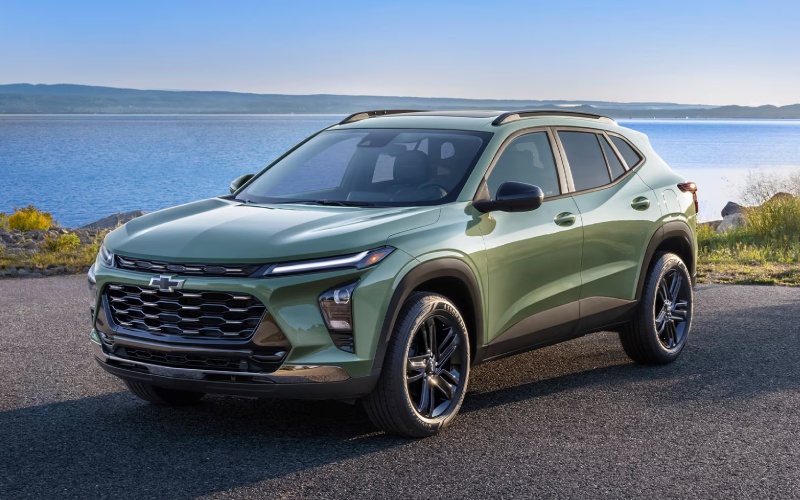
Trim choice can also influence your safety and tech experience. RS models emphasize a sport-forward attitude with a flat-bottom steering wheel that feels planted in your hands, while ACTIV brings Titanium chrome exterior accents and blackout wheels that set a confident tone without sacrificing everyday comfort. Available upgrades, like the 11-inch center HD touch-screen and wireless charging, streamline your cockpit so alerts remain easy to read and your phone stays powered for navigation and calls. The result is a driver-forward interface where critical information, turn-by-turn guidance, and safety alerts live in a clean, centralized space.
Looking for a hands-on demo of how Chevy Safety Assist works on the road? Visit us for a test drive and ask to preview safety alerts in a controlled setting. Our product specialists will walk you through customization settings, show where to find feature indicators, and pair your smartphone for a distraction-reduced workflow. When your daily commuting depends on consistent focus, pairing these safety systems with clear infotainment and simple controls can be the difference between a stressful ride and a confident one.
Ancira Partners Chevrolet GMC is proud to support drivers with practical technology walk-throughs and tailored recommendations, serving Victoria, Yoakum, and Yorktown with a thoughtful, local-first approach. Whether you aim to lease for frequent tech refreshes or finance for long-term value, the Trax’s standard safety suite and available interface upgrades make it an easy crossover to trust, from the first stoplight to the last mile home.
Frequently Asked Questions:
Does Chevy Safety Assist work at highway speeds?
Many functions are designed for a broad range of speeds. You will see certain features, like alerts and light braking support, engage when conditions meet system criteria.
Can I turn individual safety features on or off?
Yes. Use the vehicle settings to customize how specific alerts appear and when they sound, so the system aligns with your preference.
Will heavy rain or fog affect system performance?
Visibility and weather can impact performance. If sensors are limited, you may see messages indicating temporary availability changes.
Do RS or ACTIV models change how Chevy Safety Assist works?
The core suite remains consistent across trims, while added tech options—like the 11-inch center HD touch-screen—can make alerts easier to view.
0 comment(s) so far on How Chevy Safety Assist on the 2026 Chevrolet Trax Supports Confident Commuting around Victoria, TX