

How the 17.7-inch Display and Google built-in on the 2026 Chevrolet Equinox EV Streamline Drives around Victoria, TX
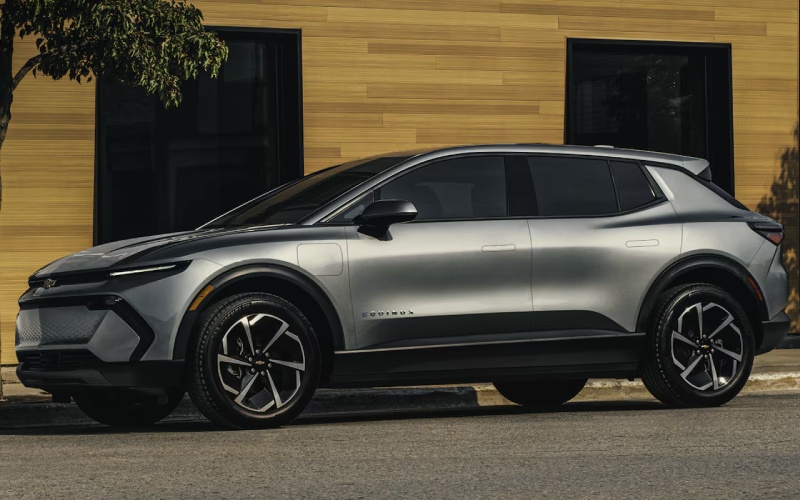
Ancira Partners Chevrolet – How the 17.7-inch Display and Google built-in on the 2026 Chevrolet Equinox EV Streamline Drives around Victoria, TX
The heart of an approachable EV is its interface, and the 2026 Chevrolet Equinox EV sets the bar with a 17.7-inch diagonal center touch-screen that brings clarity and confidence to every trip around Victoria, TX. The layout isn’t just big—it’s thoughtfully organized, responsive, and designed to keep eyes up with large tiles, high-contrast mapping, and intuitive media controls. Pair that canvas with Google built-in compatibility, and you get natural-voice navigation, calendar-aware routing, and smart suggestions that make cross-town errands or weekend detours more fluid. You can set favorites for your go-to public charging stops, preview plug availability before you roll, and navigate efficiently between appointments or school pick-up lines without juggling extra apps.
Drivers also appreciate how the display integrates seamlessly with EV-specific tools. You can monitor energy flow in real time, adjust Regen on Demand® settings, and view estimated range that responds to your driving style and climate use. When range matters—say, you’re planning a round-trip to the coast or a day split between meetings and youth sports—the screen’s clarity helps you anticipate with confidence. The myChevrolet mobile app further extends that awareness to your phone, letting you precondition the cabin while you’re still inside, then presenting a fully thawed or cooled space the moment you unplug. It’s a tight feedback loop between app, display, and the way you naturally live—quick, intuitive, and free of clutter.
- Clarity at a glance: Large tiles and crisp typography reduce distraction and shorten the learning curve.
- Smarter routing: Google built-in surfaces efficient paths and nearby charging, with voice prompts that feel natural.
- EV-aware insights: Energy screens help you fine-tune One Pedal Driving, regen use, and HVAC impact on range.
- Seamless pairing: Profiles and preferences carry over, so your display reflects how you drive, not how a system thinks you should.
- Parking ease: When equipped, available HD Surround Vision layers confidence onto tight downtown spots and driveways.
In daily life, that cohesion matters more than any one spec. For instance, if you regularly split time between local routes, a child’s school across town, and an evening commitment, you’ll appreciate how the Equinox EV’s interface anticipates the next step. Rather than forcing you through menus, the system populates context-aware decisions—like surfacing a familiar charger near your last appointment or suggesting a slightly adjusted route that saves minutes during rush hour. Combined with available Super Cruise® for hands-free driving on compatible roads, the cabin feels less like a computer and more like a natural extension of how you plan days in motion.
On the learning curve front, first-time EV drivers tend to worry about range and charging. That’s why the display’s energy pages are so valuable: you can see, at a glance, how speed, elevation, and HVAC settings influence estimates, then adjust with calm, informed choices. Prefer planning ahead? Save a multi-stop route that includes a coffee break near a public charger, and the system will guide you there while presenting status options. As the charging landscape grows, Google built-in helps maintain reliable, current info—so you’re not guessing about availability. It’s a forward-leaning setup that reduces the “what-ifs” and doubles down on simple, repeatable habits that make EV ownership surprisingly easy.
When you want to build on that ease, accessories and available features help. Wireless phone charging keeps the deck tidy, while bright roof rails support weekend gear. And if you’re frequently threading into tight parking on historic streets or bustling lots, available HD Surround Vision layers confidence over the camera view so you can glide into the spot with fewer second guesses. Ancira Partners Chevrolet GMC can demonstrate these features in a guided drive, then help you map the best home charging setup and public-charging plan that fits your routine—serving Victoria, Yoakum, and Yorktown with straightforward, step-by-step support.
Frequently Asked Questions:
Does the 17.7-inch display support split-screen views?
The layout prioritizes large, legible tiles and quick access to core functions; your consultant can demonstrate how navigation, media, and vehicle settings are presented for clarity and minimal distraction.
Can Google built-in route me to chargers along my path?
Yes, it can surface nearby charging and EV-aware routes. You can also use the myChevrolet mobile app to plan ahead, check availability, and pay at many public stations.
Is Super Cruise® tied to the display?
When equipped, the display supports clear prompts and status info, while the Driver Information screen provides key indicators for hands-free driving on compatible roads.
How do I learn One Pedal Driving?
Your product specialist will walk you through the settings and best practices, then accompany you on a short route so you can build comfort quickly.
What if multiple drivers share the SUV?
Profiles help maintain individual preferences, keeping the screen layout, navigation history, and driver assistance settings familiar every time you buckle in.
0 comment(s) so far on How the 17.7-inch Display and Google built-in on the 2026 Chevrolet Equinox EV Streamline Drives around Victoria, TX